
CAPTCHA solutions have traditionally been the first line of defense against spam traffic and malicious bots on the internet. To counter the increasing threat and sophistication of bots, CAPTCHA services have ramped up complexity - making it harder for bots to pass, but also creating more friction for legitimate users.
“No CAPTCHA” solutions reverse this trend by employing more sophisticated methods to identify bot threats while posing no or very low friction to genuine human users.
This article discusses two solutions that provide “No CAPTCHA” services:
- No CAPTCHA reCAPTCHA
- MTCaptcha Low Friction Captcha
No CAPTCHA Bot Detection and Security
No CAPTCHA is a risk-profile-driven CAPTCHA strategy. It differentiates between “safe” and “risky” traffic, allowing legitimate users to proceed without encountering an actual CAPTCHA challenge.
No CAPTCHA reCAPTCHA
reCAPTCHA uses advanced user profiling, leveraging factors such as:
- Google cookies
- Google Analytics data
- User activity tracking
- Clicks/touches
- Other browser parameters
Based on these factors, reCAPTCHA calculates a risk score that either:
- Lets the user pass
- Shows a CAPTCHA challenge (reCAPTCHA v2)
- With reCAPTCHA v3, lets the site owner decide what action to take for higher-risk traffic
MTCaptcha Low Friction Captcha
MTCaptcha employs a similar adaptive risk-profiling engine that draws on:
- Browser information
- Clicks and touches
- CAPTCHA activity trends
- Network activity
This allows most legitimate users to pass without ever seeing a CAPTCHA. It also provides an option to whitelist IP addresses, delivering a completely frictionless experience for trusted users.
No CAPTCHA User Experience
User experience is one of the primary drivers for adopting No CAPTCHA solutions. Greater accessibility, ease of use, and reduced user abandonment are among the top benefits prompting enterprises to migrate from traditional CAPTCHA solutions to No CAPTCHA alternatives.
The following table summarizes accessibility barriers and proposed solutions by type of disability:
| Type of disability | Acc. Barriers [Perceive, Solve, Access (Answer / Submit)] | How to access CAPTCHA | Proposed solution | ||
|---|---|---|---|---|---|
| Perceive | Solve | Access (Answer / Submit) | |||
| Visual disability | X | X (*) | User may need AT such as magnifier or screen reader | Provide the user the perception of the CAPTCHA with auditory modality. In addition, the WCAG 2.0 must be achieved, so the user can access with their AT such as a keyboard to ensure they can access (answer / submit) the form. | |
| Auditory disability | User should not have any problem perceiving, solving, and accessing (answer, submit) the form because it is perceived by visual modality. In addition, the WCAG 2.0 must be achieved. | ||||
| Motor disability | X (*) | User accesses with keyboard or may need AT | The WCAG 2.0 must be achieved, so the user can access with their AT such as a keyboard to ensure they can access (answer / submit) the form. | ||
| Cognitive disability | X | X (*) | User can have difficulties understanding and solving the CAPTCHA | Limiting the degree of difficulty of the CAPTCHA to ensure the user can solve it. In addition, the WCAG 2.0 must be achieved. | |
| Visual and auditory disability | X | X (*) | User may need AT such as Braille displays | The WCAG 2.0 must be achieved, so the user can use their AT to perceive and access (answer and submit) the form. | |
| Visual and motor disability | X | X (*) | User may need AT such as screen reader, magnifier, and keyboard-only navigation | Provide the user the perception of the CAPTCHA with auditory modality. In addition, the WCAG 2.0 must be achieved, so the user can access with their AT to ensure they can access (answer / submit) the form. | |
| Visual and cognitive disability | X | X | X (*) | User may need AT such as screen reader or magnifier, and can have difficulties solving the CAPTCHA | Provide the user the perception of the CAPTCHA with auditory modality. The difficulty of the CAPTCHA should also be restricted so the user can solve it. In addition, WCAG 2.0 must be achieved. |
| Auditory and motor disability | X (*) | User accesses with keyboard or may need AT | User should not have any problem perceiving or solving the CAPTCHA, since it is perceived by visual modality, but WCAG 2.0 must still be met to ensure access with AT such as a keyboard. | ||
| Auditory and cognitive disability | X | X (*) | User can have difficulties understanding and solving the CAPTCHA | User should not have any problem perceiving or solving the CAPTCHA visually, but its difficulty should be limited and WCAG 2.0 must be achieved. | |
| Motor and cognitive disability | X | X (*) | User accesses with keyboard or may need AT, and can have difficulties solving the CAPTCHA | The difficulty of the CAPTCHA should be restricted so the user can solve it, and WCAG 2.0 must be achieved so the user can access it with AT such as a keyboard. | |
(*) If web content does not fulfil the WCAG 2.0.
Accessibility
No CAPTCHA reCAPTCHA - With reCAPTCHA v3, Google provides a risk score but leaves the decision of how to verify higher-risk traffic to each site. A fallback to a traditional visual CAPTCHA is still possible, though reCAPTCHA itself offers limited guidance on WCAG or VPAT compliance.
MTCaptcha Low Friction Captcha - MTCaptcha allows low-risk users to bypass CAPTCHA challenges entirely. For higher-risk users, it presents CAPTCHA tests of varying complexity. MTCaptcha is WCAG 2.1 AAA-compliant, offering both visual and audio CAPTCHAs and supporting screen readers.
No CAPTCHA Privacy and GDPR
Privacy is another significant consideration - especially for enterprises. With GDPR emphasizing user privacy and data control, it’s crucial to understand how each CAPTCHA solution handles personal information.
No CAPTCHA reCAPTCHA
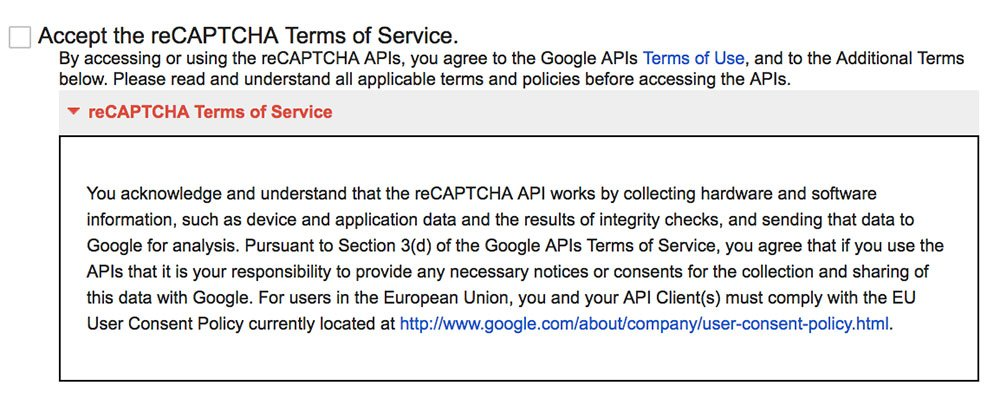
reCAPTCHA leverages Google Account data and cookies containing personal identifiers. This raises privacy and GDPR concerns among businesses and is a key reason many have moved away from reCAPTCHA services.
MTCaptcha Low Friction Captcha
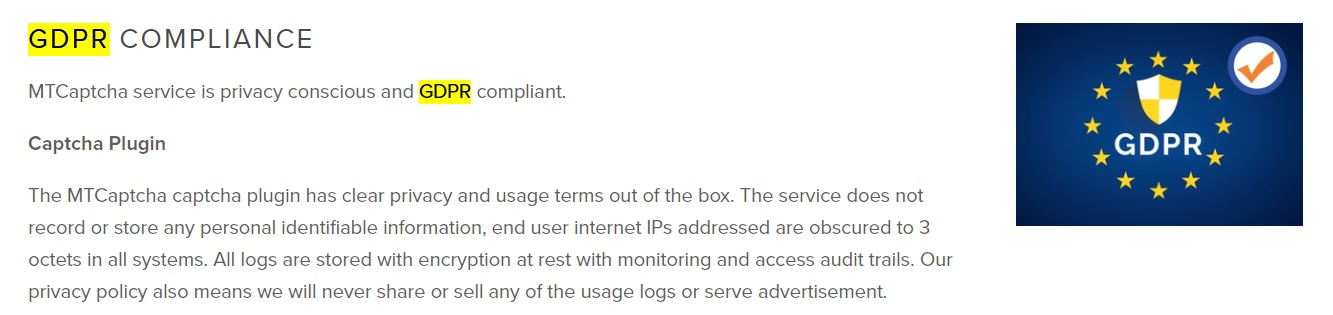
MTCaptcha complies with GDPR by avoiding the collection of personal information within the CAPTCHA itself, thus easing the compliance burden for its customers.
Conclusion
By choosing a No CAPTCHA solution - whether it’s Google’s reCAPTCHA or MTCaptcha’s Low Friction Captcha - you can maintain robust bot detection while minimizing the burden on real users. Prioritizing user experience, accessibility, and privacy will help you make the best choice for your organization.
Frequently Asked Questions
Is MTCaptcha fully GDPR-compliant?
Yes. It anonymizes personal data and stores no PII.
Does MTCaptcha store personal data?
No. MTCaptcha doesn’t collect or store any personal data. IP addresses are truncated and never stored in a way that can identify an individual user.
How does MTCaptcha perform against bot attacks?
It uses an adaptive risk engine; the system continuously monitors and responds to environmental threats, making MTCaptcha easy on real humans and difficult for bots. Both low-friction invisible captcha and classic variations are available to support diverse risk profiles and use cases.
What about performance and page load times?
Scripts are lightweight and served via global edge nodes, minimizing any load-time impact.
How difficult is it to migrate from reCAPTCHA?
It’s straightforward - similar script placements and backend token checks. MTCaptcha provides clear documentation and support channels.